 Fillwardenby Atesen Software
For B2B SaaS teams that sell to enterprises
Fill the next security questionnaire with answers you already wrote
Every enterprise deal brings another spreadsheet that asks the same things in new words. Fillwarden matches each question to your past answers, writes them into the buyer’s own Excel file, and flags every row you should check. It runs in your browser, so your security answers never leave your computer.
$29 per month or $290 per year · free plan fills 20 answers per file
- Files never leave your browser
- Secure checkout by Paddle
- 14-day money-back, cancel anytime

The slow part is finding what you already said
Your team has answered “Do you enforce MFA?” a dozen times. The answer is somewhere in last quarter’s files.
Same question, new words
“Do you enforce two-factor authentication for staff?” and “Is MFA required for all employees?” need one answer. Fillwarden knows 2FA, MFA and multi-factor authentication are the same thing.
Answers spread across files
A SIG Lite here, a CAIQ there, five customer spreadsheets in between. Import them once and they become one library you can search and reuse.
No new vendor to explain
Uploading security answers to another AI service adds a third party your buyer may ask about. Fillwarden reads and writes the files on your own computer.
From the buyer’s spreadsheet to a filled file in three steps
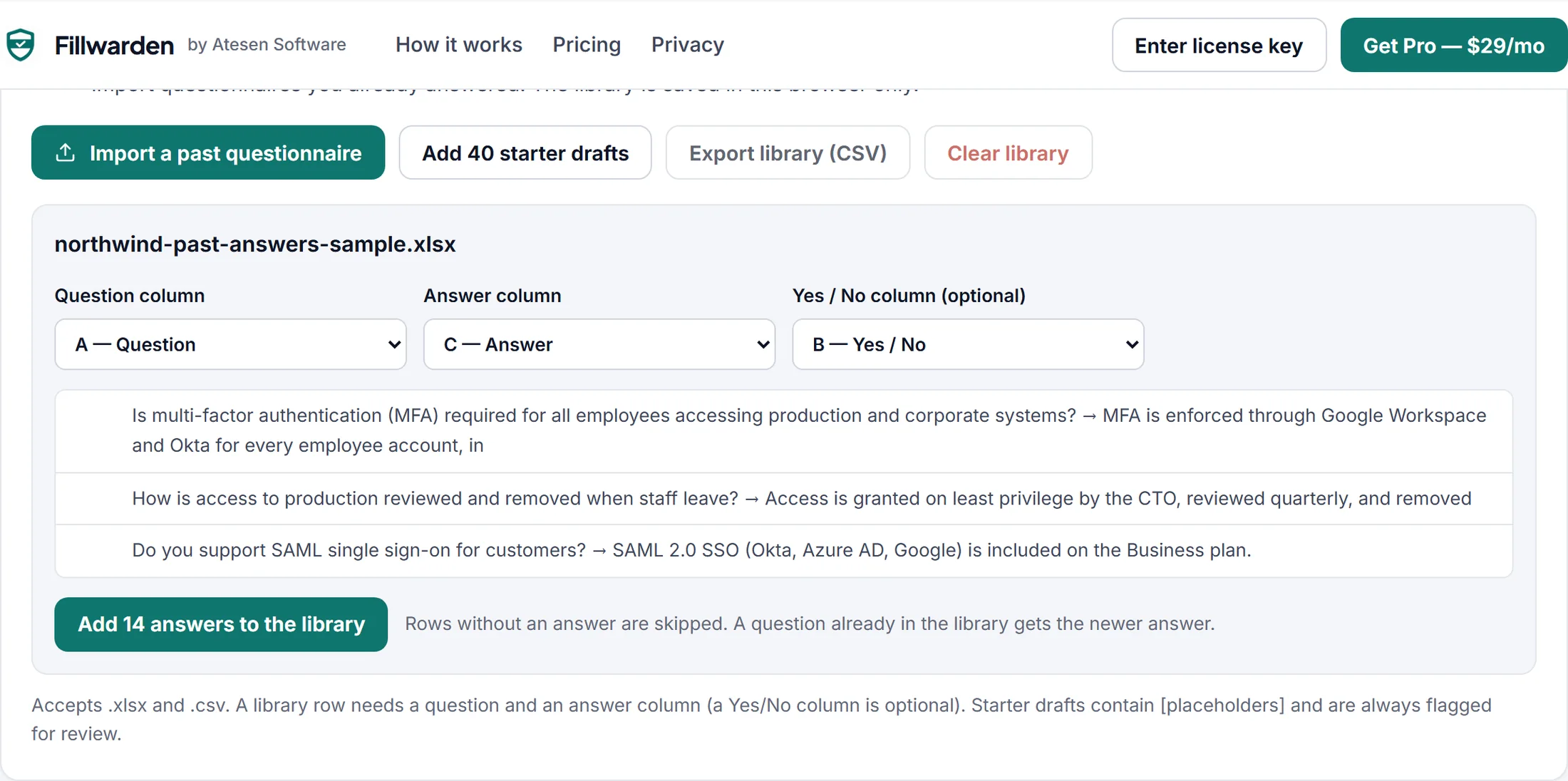
Import what you already answered
Open a completed questionnaire. Fillwarden finds the question and answer columns and turns every answered row into your library.
- .xlsx and .csv, any layout with one question per row
- Saved in this browser; export it as CSV anytime
- Optional starter drafts with [placeholders] for a first library
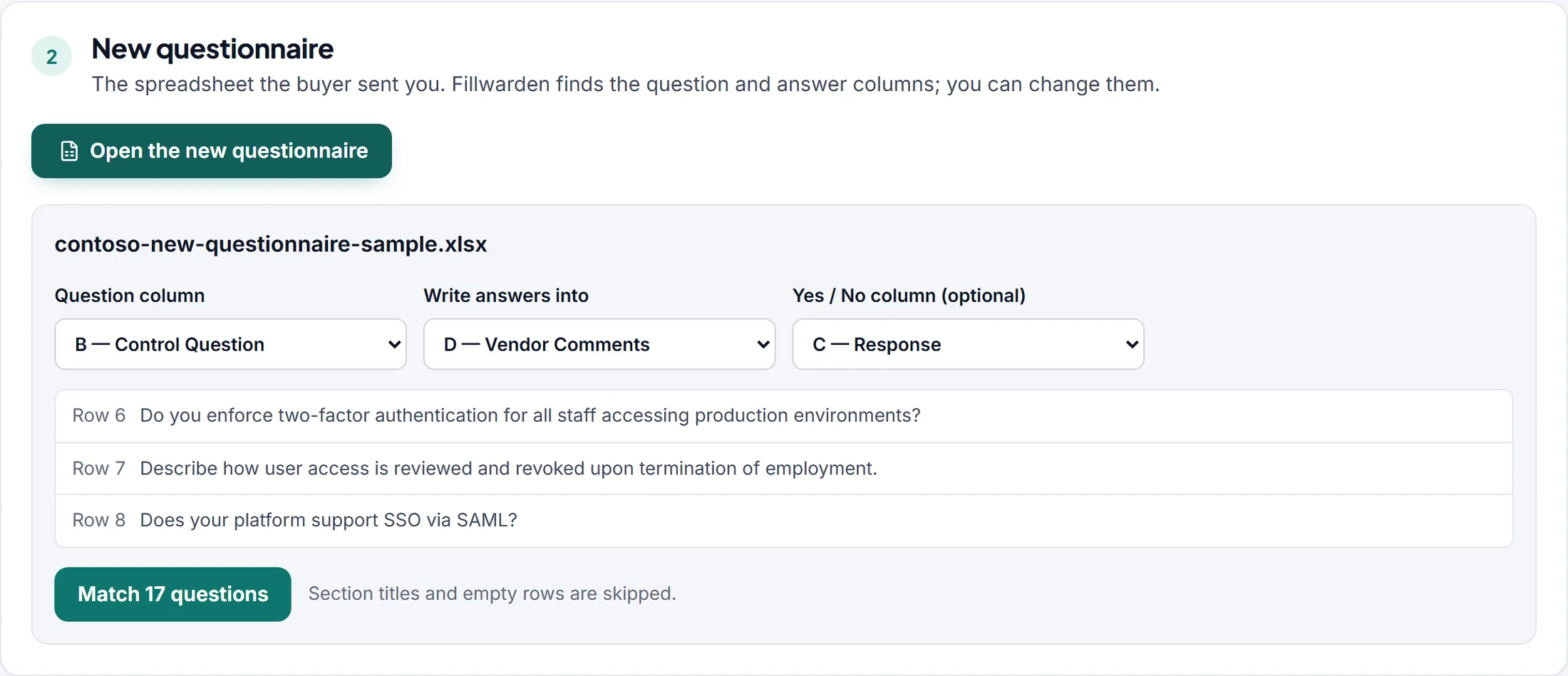
Open the buyer’s questionnaire
Fillwarden picks the question column and the column to write into, including the common layout with a Yes/No column next to a comments column.
- Section titles and already-answered rows are left alone
- Change any column with one click before matching
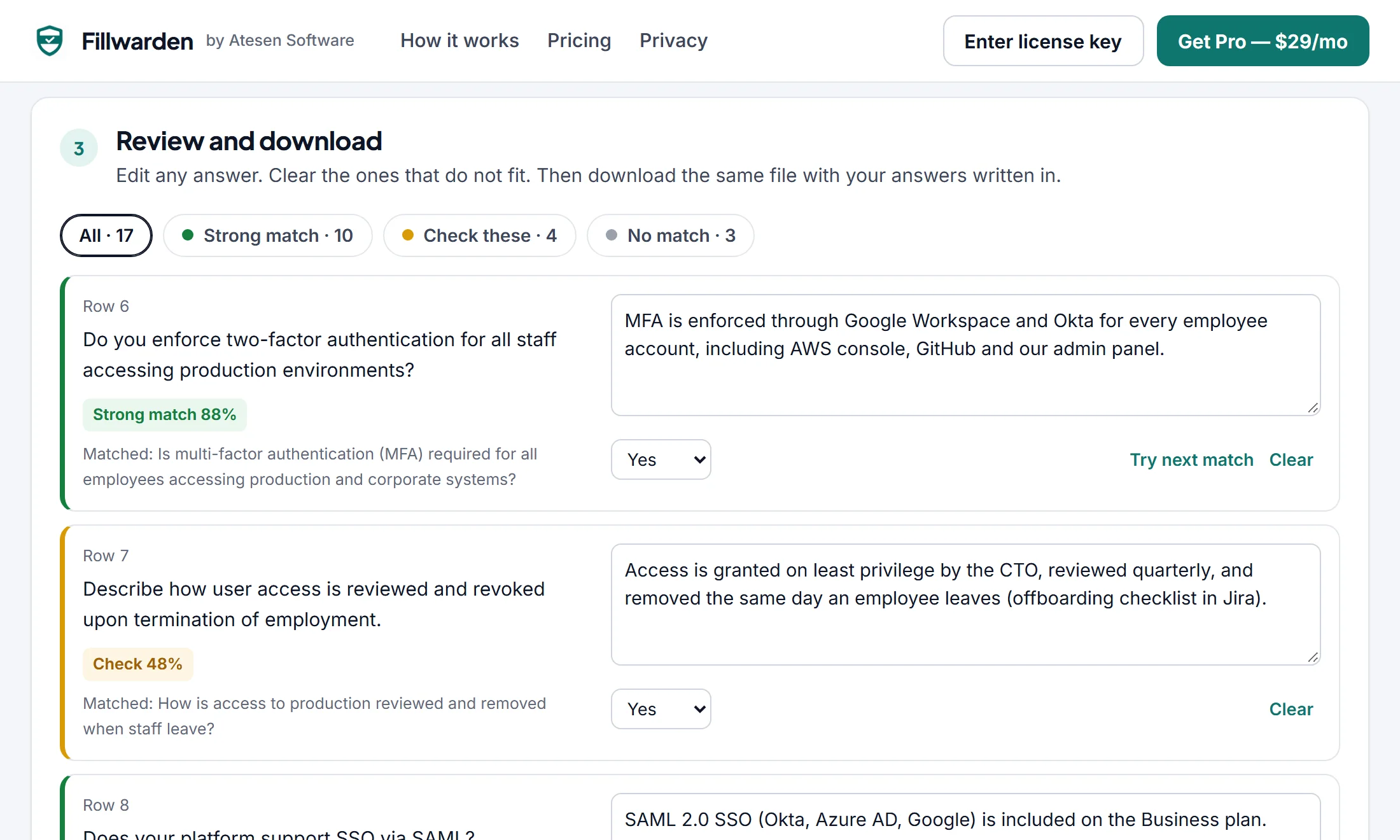
Check the flagged rows, download the same file
Strong matches are ready. Rows marked “Check” show which past question they came from. Rows with no match stay blank: nothing is invented.
- Answers are written into the original workbook
- Sheets, formatting, column widths and dropdowns are kept
- New answers you type are added to your library
What Fillwarden does, and what it does not
It is a focused tool for reusing your own answers. It is not a compliance platform.
| Fillwarden | Typical cloud questionnaire platforms | |
|---|---|---|
| Where your files go | Stay in your browser | Uploaded to the vendor’s cloud |
| Where answers come from | Your own past answers, word for word | AI-written drafts from your documents |
| When nothing fits | Row stays blank and flagged | Often a generated draft |
| Output | The buyer’s own .xlsx, filled in | Varies by tool |
| Price | $29/month, cancel anytime | Usually $99 or more a month, often yearly contracts |
| Trust center, SOC 2 evidence, AI rewriting | Not included | Often included |
One plan. One price.
Try the whole flow free. Upgrade when you want every answer written into the file.
Free
$0
No account, no card
- Unlimited answer library
- Match and review every question
- Download with up to 20 answers per file
Pro
$29 per month
or $290 per year (two months free). Paddle adds VAT or sales tax where it applies.
- Every answer written into every file
- One subscription for your company; use the key in each teammate’s browser
- Email support from the person who builds it
- Secure checkout by Paddle
- 14-day money-back
Questions
Is anything uploaded?
No. Your browser reads and writes the spreadsheets, and the library is stored in this browser’s local storage. The only request to our server is the license check for Pro, which sends your license key and nothing else.
Does it use AI to write answers?
No. Fillwarden compares the wording of each new question with the questions in your library, using a matcher that knows security vocabulary (MFA = 2FA, SSO = SAML, pen test = penetration test, and so on). It then copies the answer you wrote before. If nothing fits, the row stays blank.
Which questionnaires work?
Spreadsheets with one question per row: SIG Lite, CAIQ, and the custom Excel or CSV files buyers send. Old .xls files need to be saved as .xlsx first. PDF and Word questionnaires are not supported.
Will the buyer’s formatting survive?
Fillwarden writes into the same workbook, so sheets, formatting, column widths and dropdown lists stay. Charts and macros may not be kept, so keep the original file too.
How accurate is the matching?
Each row shows a match score and the past question it came from. Strong matches are close in meaning; rows marked “Check” need a quick read. Starter drafts are always marked “Check”. You decide what goes into the file.
Can my team share one library?
Yes: export the library as CSV and import it in a teammate’s browser. One Pro subscription covers one company; use the same license key in each person’s browser.
How do I cancel or get a refund?
Cancel anytime from the link in your Paddle receipt. Every charge has a 14-day money-back guarantee; see the refund policy.
Who makes Fillwarden?
Atesen Software, a small independent software maker (Samet Ateşen, Türkiye). Paddle is the merchant of record and handles payment, tax and invoices.
Your next questionnaire is already half answered
Import one past questionnaire, open the new one, and see how many rows fill themselves.
- Files never leave your browser
- Secure checkout by Paddle
- 14-day money-back